
Album Cover Generator
Square album art with artist and title set — composed to read as a thumbnail
4 free credits on sign-up — your first Standard image with any tool, no card required.
- 01Enter the artist name, album title and genre
- 02Render two or three directions and squint-test them as thumbnails
- 03Upscale the keeper for vinyl or CD, or reframe it into banners
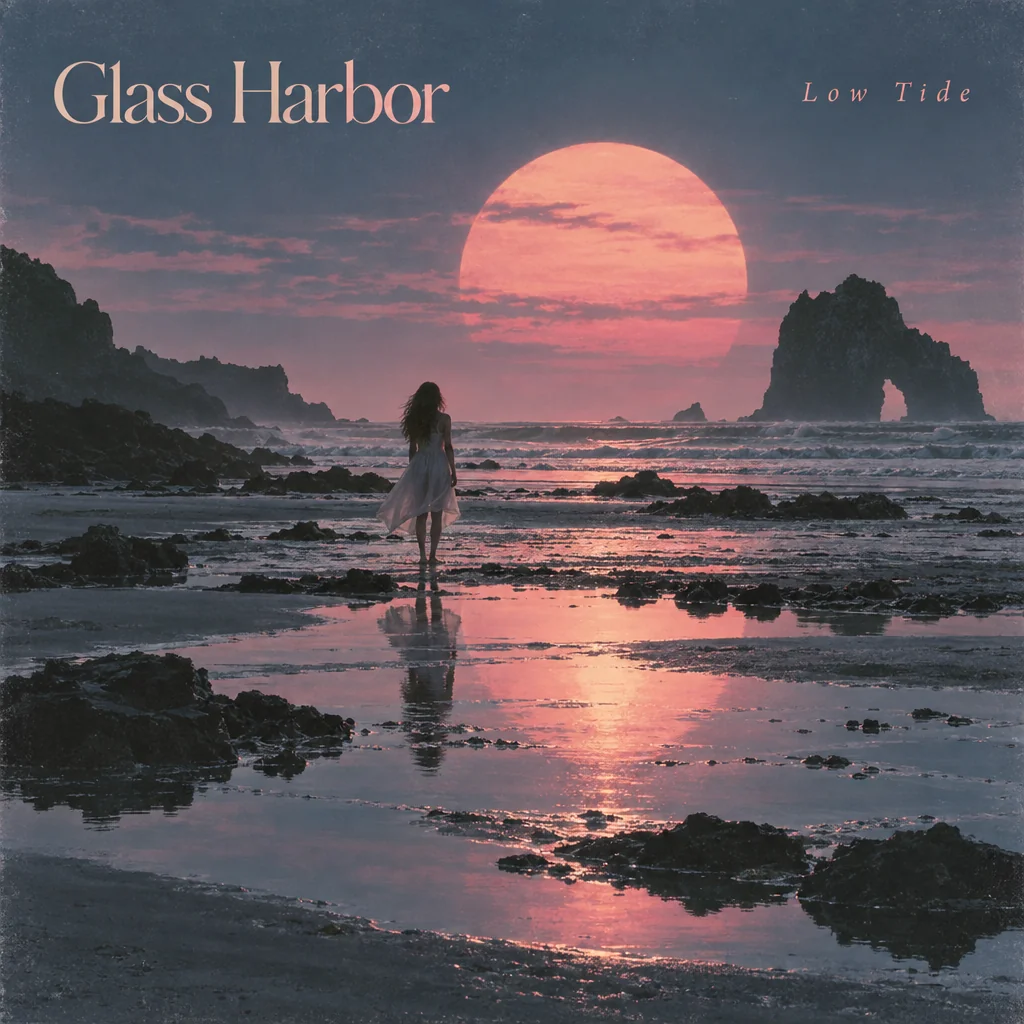
Made by this tool from the fields listed below.
Album art now has to work at 60 pixels in a streaming app and at 12 inches on vinyl at the same time. The Album Cover Generator composes for both: a square cover with striking imagery that fits the genre, a cohesive palette, a bold composition that reads at thumbnail size, and the exact artist name and album title integrated into the artwork with no other words, no mockup and no case. Independent musicians, podcasters, playlist curators and small labels use it to give a single or an EP a real cover before the upload deadline, without commissioning artwork for every release.
Genre is the steering wheel. "Dream pop" pulls in soft light and haze; "UK garage" pulls in bold type and urban texture; "folk" pulls in hand-drawn warmth; "techno" pulls in stark geometry. Add a word or two to the genre field if you want to nudge it — "melancholic dream pop", "sunny surf rock" — and the palette and imagery follow. The generator also keeps the artist name and title legible at thumbnail size, which is the constraint most home-made covers fail, and it avoids mockups and cases so the file is upload-ready.
Render a few directions for the same release, pick the one that still reads when you squint, and upscale it for vinyl or CD printing. Image Text Editor changes a title or fixes a letter without re-rendering the artwork, and Reframe can extend the image into a wide banner for a streaming profile or a 9:16 story teaser. For an EP series, keep the artist and genre fixed and change only the title. Because both text fields are rendered as part of the artwork, check spelling at Pro or Max quality before distribution; Image Text Editor can fix a letter without touching the rest of the cover.
What you set
- Artist namee.g. Glass Harbor
- Album titlee.g. Low Tide
- Genree.g. dream pop
- 1:1 output
After it's made
- Change details with a sentence, or hand it to any other tool
- Standard, Pro and Max quality on every make
- Enlarge to 32 megapixels or turn it into a short clip
- Every image saved to your library, downloadable full size
About this tool
- Can I leave the text off and add my own type later?
- Put a short placeholder in the title field and crop or paint it out, or ask for it to be small and near an edge in the genre field. The AI Image Generator at 1:1 is the better route for pure artwork with no lettering.
- What size is the cover?
- A square render at the model's native resolution — fine for every streaming store. For vinyl or CD printing, send it to Upscale first; 16 megapixels covers a 12-inch sleeve comfortably.
- How do I make a series of singles that match?
- Keep the artist and genre fields identical and change only the title; the palette and imagery stay in the same family. Image Variations from one favorite is another way to get siblings.
- Will the artist name be legible on a phone?
- The composition is built to read at thumbnail size, with the text integrated rather than tiny. Check at Pro or Max quality, and use Image Text Editor if a letter needs cleaning up.
- Can I try Album Cover Generator before paying?
- Yes. A new account starts with 4 free credits, which covers your first Standard image with Album Cover Generator — no card required. After that, credits come from a monthly plan or a one-time pack.
Often used next
Book Cover Generator
Front covers with the title and author name set — genre-aware, print-ready 2:3
AI Poster Maker
Headline plus theme becomes a print-ready poster in eight graphic styles
Image Text Editor
Replace text inside an image and keep the original font, color and perspective
Reframe & Expand
Extend a picture to any aspect ratio — the scene continues past its edges
Made for